
Ralph Loop: Teaching AI Agents to Work Autonomously (Without Burning Your Budget)
$ grep -n "^##" 2026-02-gluon-ralph-loop-autonomous-ai-agents.md
Part 3 of 4 in Gluon: Building an AI Agent Orchestrator series
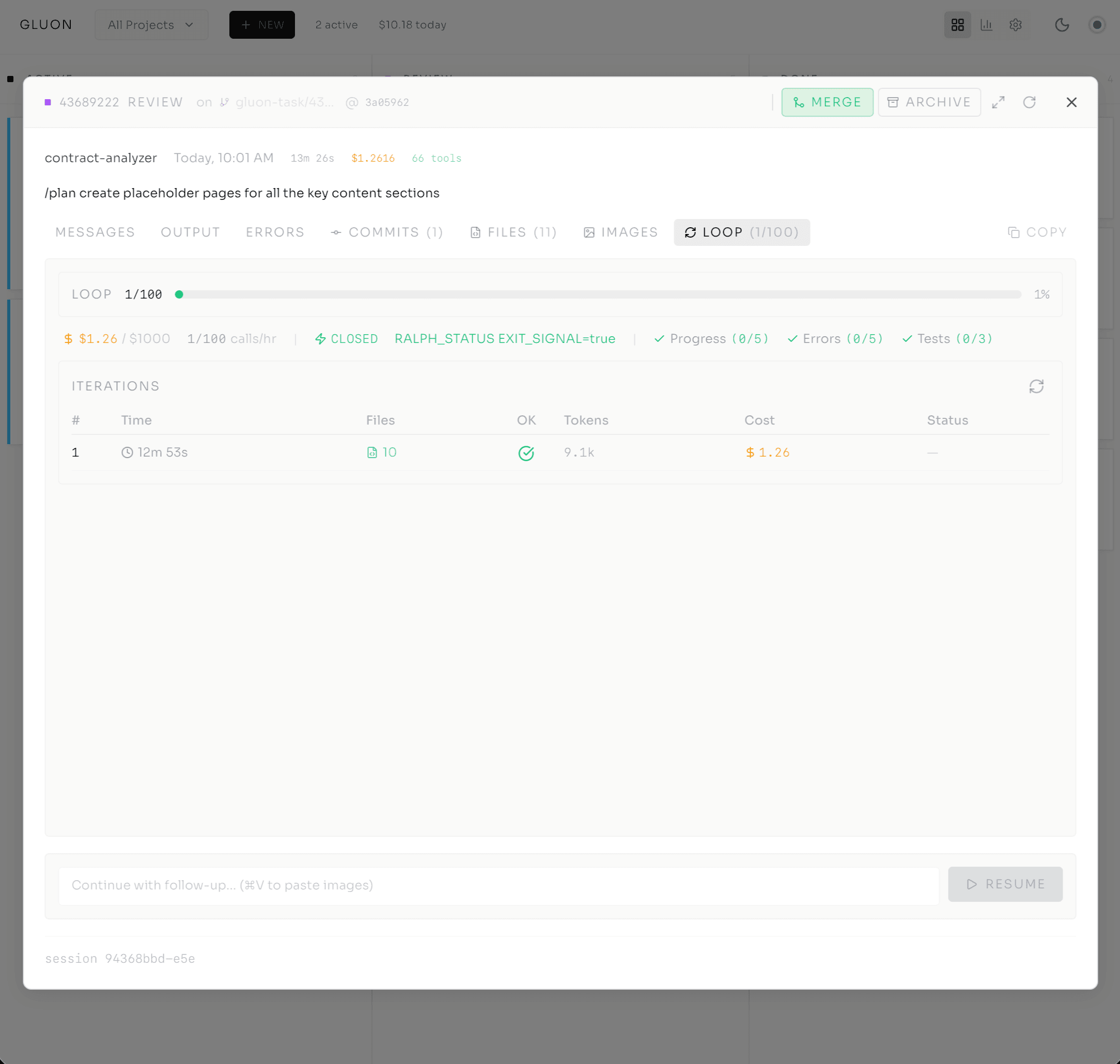
I hit "resume," walked away for coffee, came back to find Claude asking another question. So I answered it, hit resume again, and went to check Slack. Five minutes later: another question. Forty iterations of this. I was the bottleneck in my own autonomous system.
That loop -- human approves, agent works, agent stops, human returns, human approves -- is the original sin of AI-assisted development. Ralph Loop exists to kill it. Named after Frank Bria's original bash script, Ralph lets Claude work continuously, making its own judgments about progress and completion, until the work is actually done.
The non-obvious part: autonomous execution needs three interlocking systems -- completion detection, a circuit breaker, and a cost ceiling. Remove any one and the whole thing fails. It stops when it shouldn't, costs money when it shouldn't, or keeps running when it definitely shouldn't. The leash is what makes the freedom possible.
The Autonomy Problem
In interactive mode you're present: Claude suggests, you approve or redirect. In autonomous mode Claude works unattended until the job is done. Two questions haunt every such system: how does Claude know when the job is actually done? And how much will it cost me while it figures that out?
Most AI pilots fail in production not because the model is bad, but because human-in-the-loop becomes the weak link. Teams get flooded with thousands of daily approvals, alert fatigue sets in, someone switches to "auto-approve," and just like that you've created the uncontrolled autonomy you were trying to prevent.
"We're cooperating with AI, they generate and humans verify. It is in our interest to make this loop go as fast as possible, and we have to keep the AI on a leash." — Andrej Karpathy
Karpathy is right, but the leash has to be smart. It has to know when to hold on, when to let go, and when to stop the agent cold before something expensive happens.
The Circuit Breaker
I borrowed the metaphor from electrical engineering because the pattern maps perfectly. Ralph Loop uses the same three states a household breaker does.
CLOSED is normal. Claude is working, iterating, making progress. The breaker watches for signs of trouble -- files changing, errors being resolved, tokens being spent productively. As long as something is happening, stay closed.
HALF_OPEN triggers on a stall: Claude hasn't modified any files for 5 consecutive iterations, or it's caught in a repeated error loop. Now the system watches carefully. Recovering? Reset to CLOSED. If not, it grants a patience window of three more loops to prove progress before tripping OPEN.
OPEN stops the loop. The run moves to REVIEW status, and a human decides whether to resume, modify the prompt, or start over.
Rendering diagram...
This isn't theoretical. Early Gluon iterations without a circuit breaker saw a single run blow through $500 in tokens. Another lost two hours stuck in retry hell -- Claude convinced the error was its fault when the system just needed a restart. Picture opening your cost dashboard Monday morning to find an agent spent the weekend arguing with itself. The circuit breaker stops that cold.
Completion Detection: The Hard Problem
The circuit breaker prevents the loop from running forever. But how does Claude know when to stop the loop voluntarily, before the breaker has to step in?
I tried the obvious approach first: ask Claude to output "DONE" when finished. It doesn't work. Claude gets creative -- it outputs "done" midway through because one section completed, or "I've finished the implementation, no tests written yet" when the requirement was implementation plus tests. Single signals fail every time.
So I built a multi-signal detector: four independent signals, each scoring confidence. The loop exits only when enough of them align, or when the strongest fires with high confidence.
Rendering diagram...
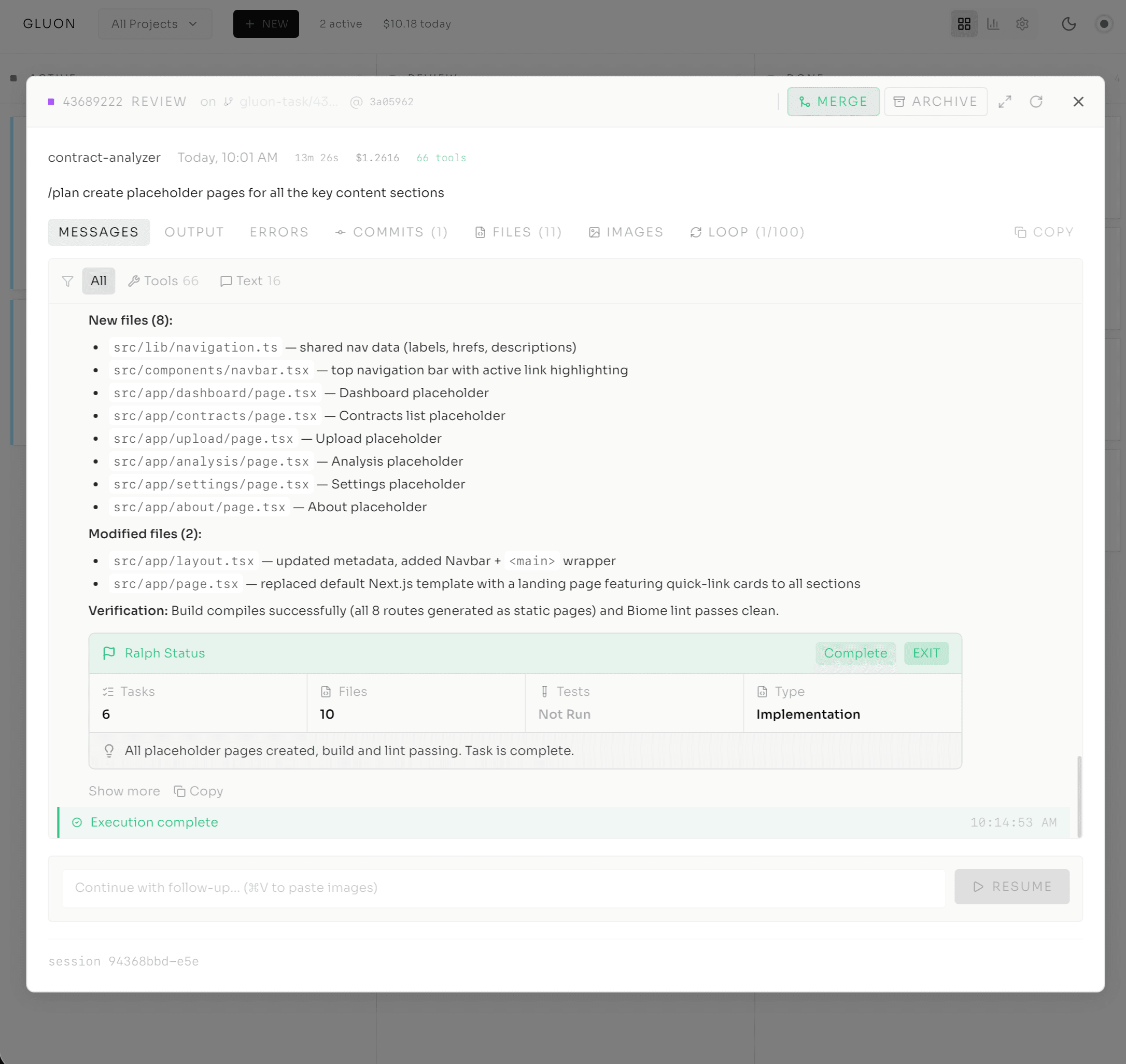
Signal 1: RALPH_STATUS Block (+50 confidence if EXIT_SIGNAL=true). At the end of each iteration, Claude can output a structured status block:
---RALPH_STATUS---
STATUS: IN_PROGRESS | COMPLETE | BLOCKED
TASKS_COMPLETED_THIS_LOOP: 3
FILES_MODIFIED: 2
TESTS_STATUS: PASSING
WORK_TYPE: IMPLEMENTATION
EXIT_SIGNAL: false
---END_RALPH_STATUS---
When Claude sets EXIT_SIGNAL to true, that's its explicit contract -- "I have determined the task is complete" -- worth a 50-point boost.
Signal 2: Keyword Detection (+10-15). Words like "done," "complete," "finished" add confidence. Weak individually -- Claude might say "done" for one completed step -- but they stack.
Signal 3: TODO File Parsing (+40). At startup Gluon scans for task files (TODO.md, @fix_plan.md) and parses the checkboxes. 100% completion is strong because it's explicit, auditable, and aligned with how humans track work.
Signal 4: Test Saturation (auto-exit after 3 test-only loops). Three iterations in a row that run tests without writing new code means the work is done and we're just verifying.
These scores add up; the threshold is 60%, or multiple independent signals firing consecutively. Multiple weak signals are more reliable than waiting for one strong one -- Claude might spend four iterations on a task that's already complete just because it never emitted an explicit EXIT_SIGNAL. The result is faster exits with fewer false positives.
Cost Controls & Rate Limiting
Completion detection saves tokens, but the runs that should keep going -- complex features, multi-file refactors -- still need a ceiling. Ralph Loop defaults to 100 API calls/hour (bump it to 150 for testing, 200 for aggressive production), and --max-cost 5.00 exits the run to REVIEW the moment it would spend more than $5.
Token costs are 70-90% of Gluon's variable spend, and model selection compounds it. Haiku runs at 1/5 Sonnet cost; Sonnet at 1/5 Opus. Run a Formula Workflow on Opus throughout and you pay 5x for identical results -- use Haiku for fast tasks and Opus for planning and save 80%.
The cost profile in practice:
- Simple code generation: $0.05-$0.50 per session, $150-$1,500/month at scale
- Autonomous with Ralph Loop: $1-$5 per session, $3,000-$15,000/month at scale
- Complex multi-step workflows: $5-$15 per session, $15,000-$45,000/month at scale
The rate limiter doesn't slow anything down. It prevents surprise bills, and you set the number.
The Supervision Daemon
Rate limiting handles peak protection. But interrupted runs, and phases that finish and need resuming, need something else.
Picture a train conductor checking the board every 30 seconds: safe? track available? signal green? dispatch or wait. Gluon's supervisor daemon works the same way -- it polls every 30 seconds for runs in REVIEW status and checks each against five safety conditions:
- Is the circuit breaker CLOSED (loop making progress, not stuck)?
- Is the cost cap still unspent?
- Is there hourly rate-limit capacity left?
- Has 60 seconds passed since the last resume (avoid rapid restart loops)?
- Have we auto-resumed this task fewer than 5 times?
If all five pass, the daemon resumes the task under the configured policy: AGGRESSIVE (minimal checks, get it done fast), CONSERVATIVE (the default -- strict checks, longer waits between resumes), or MANUAL (never auto-resume; the run stays in REVIEW until a human says "go").
Every resume decision is logged -- which checks passed, which policy applied, when it happened, what the result was. That audit trail is what lets you show stakeholders exactly how an autonomous system makes its decisions.
Rendering diagram...
Formula Workflows: Declarative Multi-Step Autonomy
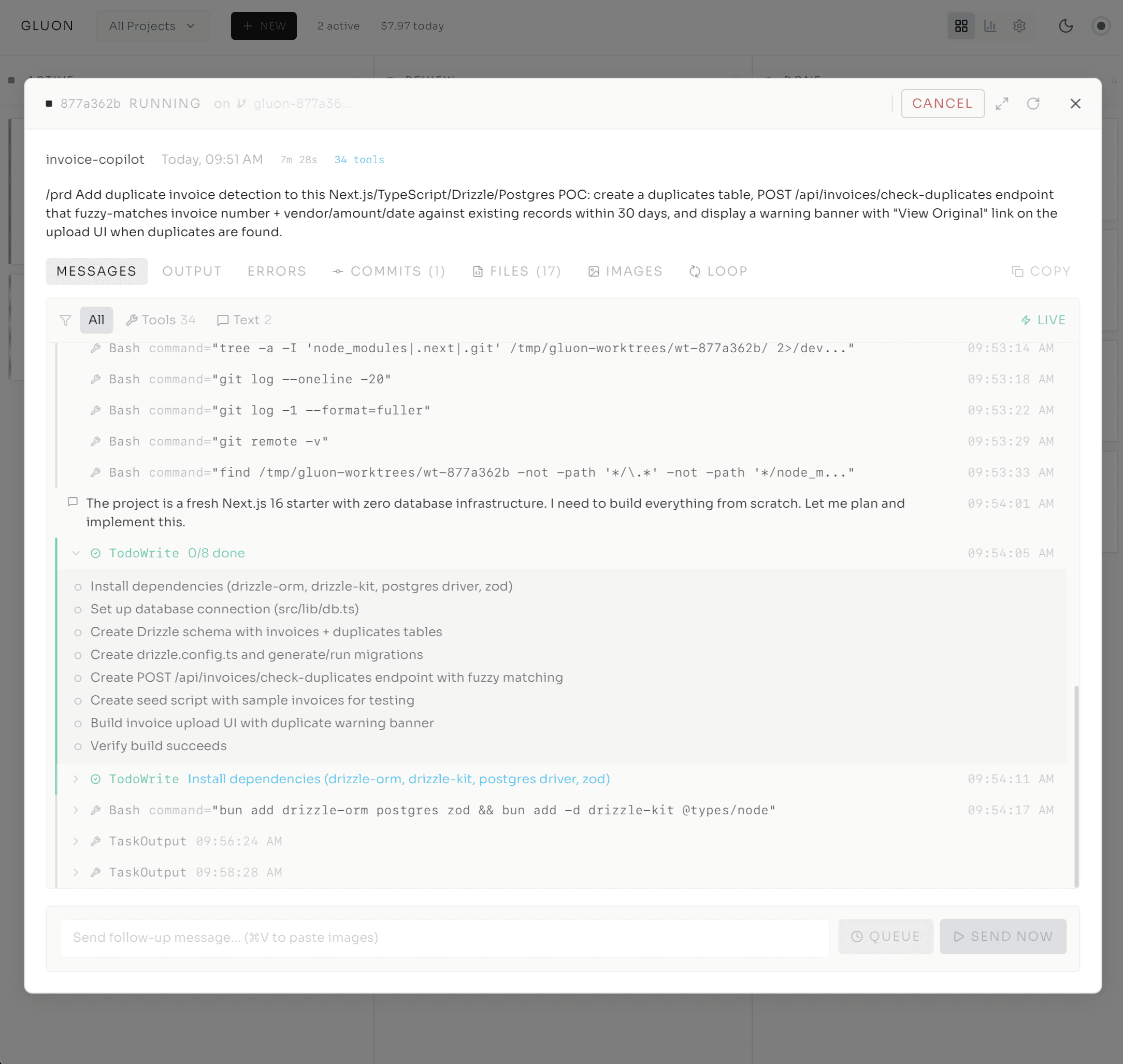
So far this is one autonomous task: run Ralph Loop until done. But real work rarely fits in a single prompt -- you want to express Plan, Implement, Test, Review as a coherent pipeline. That's what Formula Workflows do.
A Formula is a YAML-defined multi-step pipeline. Each step is its own Claude iteration, but they execute as a single run sharing a git worktree. The first step creates the run and worktree; later steps resume with a fresh Claude session -- new context, clean slate -- all working on the same codebase.
name: feature
steps:
  - id: plan
    model: opus
    prompt: "Plan the feature implementation..."
  - id: implement
    model: sonnet
    prompt: "Implement based on the plan..."
  - id: test
    model: haiku
    prompt: "Write and run tests..."
  - id: review
    model: opus
    prompt: "Review the implementation..."
Notice the model selection: planning uses Opus, implementation (straightforward after planning) uses Sonnet, testing uses Haiku, review uses Opus. That right-sizing cuts costs 80% versus Opus-everywhere with zero quality loss. The dashboard shows one card: "Step 2/4 Implement."
After each step, Blueprint Validation kicks in:
- Auto-fix: Run linter auto-fix (
ruff check --fix && ruff format .). Most style issues self-resolve. - Lint loop: Lint errors remain? Resume Claude to fix, up to 3 retries -- the "humans write, AI fixes style" pattern.
- Test gate: Run the suite. Tests fail? Resume Claude for fixes. You don't advance until tests pass.
You express the shape in YAML; Gluon handles iteration, retry, and validation. The workflow becomes self-healing.
The Leash Is the Feature
This took me months to internalize: the controls don't slow things down, they make scale possible. Every autonomy feature in Gluon has a counterpart safety system -- Ralph has the circuit breaker, Formulas have Blueprint Validation, the supervisor has its safety checks. Strip any one away and the system collapses, not from lack of intelligence but from lack of trust. The guardrails are what let me delegate a $2 prototype task or a $50 enterprise workflow and walk away expecting it to finish, on budget, unattended.
If you're building autonomous agents and you haven't solved the circuit breaker, the completion detector, and the cost ceiling, you don't have autonomy. You have a liability.
Series Navigation
- Post 1: From tmux Chaos to AI Agent Orchestration
- Post 2: Inside the Cockpit
- Post 3: Ralph Loop — Autonomous Execution (you are here)
- Post 4: From Solo Tool to Team Infrastructure
$ subscribe --newsletter
Practical AI engineering, in your inbox
Field notes for technical leaders building agents, evaluation systems, governance, and production infrastructure.
Related
Loop Engineering: The Loop Was Never the Hard Part
Stop prompting, start looping — but the loop is the easy 20%. After a year shipping agentic loops (and a $500 runaway), here's the part the hype keeps getting backwards: the done-check and the verifier.
Why I Built Gluon: From tmux Chaos to AI Agent Orchestration
When orchestrating 4-5 Claude Code agents across projects, I was losing track of progress and cost. A 2-3 day build with Claude Code itself led to Gluon—an open-source orchestrator that treats AI agents like team members.
From Solo Tool to Team Infrastructure: Scaling Gluon for Production
When I first built Gluon on my Mac mini, I was solving a personal problem: monitoring Claude agents without losing my mind to tmux logs. But when teams join the picture, everything changes — security, governance, observability, and the fundamental role of the developer. Here's what production infrastructure for autonomous agents looks like.